Showing posts with label AbleNet. Show all posts

Friday, May 14, 2010

Equals


I received the Equals curriculum from AbleNet yesterday and have eagerly been going through it. It came in two huge boxes plus a giant tube. So far I'm impressed. They provide everything needed to implement the basics of the program including a step-by-step and an All-Turn-It spinner. There are a ton of manipulatives and they seem really high quality. They are the kinds of things I've seen at educational supply stores for the most part, although I've never seen the nifty hands-on/manipulative numberlines included in the package. There are lots of posters and other print materials. While I think I read somewhere (the website?) that the printed materials came laminated, these were only poster-quality paper and I will definitely be laminating everything, hopefully with 7-10 mm laminate to help them last as long as possible. I've only read through the Overview manual so far and it looks really good. I like how they've differentiated for all levels of students and all the helpful hints and suggestions for adapting for different needs and activities. The Action Dictionary is very comprehensive and will be great for my paras to refer to. I also liked how they found unique ways to use the manipulatives as well as multiple uses for the different items in the kit.

I haven't had time to read through the curriculum guides but am really hopeful that I will be just as pleased with them as I already am with everything else. It looks like they've even differentiated for low vision, or at least made it easy for me to do so. There is a CD which appears to contain a whole bunch more print materials (communication boards, Super Talker overlays, worksheets, etc.). There is a comprehensive assessment piece as well that again appears to accommodate a wide range of needs and abilities. The curriculum itself is even contained in one of those fancy boxes "real" curriculum comes in (basal readers, etc.; harkening back to my student teaching days). It truly looks like we finally have a curriculum for the severe/profound population that actually meets the needs of students with the most severe disabilities. YAY!

At this point I think my only suggestion for AbleNet would be to provide a la carte pricing for the items in the kit so replacements can easily be ordered. Over time posters will get worn or torn, work mats damaged, manipulatives lost, etc. It would be nice to be able to replace them as needed. And there might be programs that would like to order multiples of the manipulative kit to be able to spread the wealth between multiple classrooms.

I'm looking forward to implementing the program this fall. I'm having to hold myself back from starting it now. We only have three days of school left, after all, and one of those is a promotion celebration for three of my students who are moving from the middle school level to the high school level. I really don't have to push my kids that hard do I? They are all just glad that we finally finished the Hatchet unit. I'm sure I'll be writing more about our experiences with Equals as we add it to our daily activities.


Disclaimer: I am writing this review under my own volition. AbleNet has not provided me with any kind of remuneration or compensation for sharing my thoughts nor do I seek such. My desire is simply to share information about a program others who do what I do might find interesting.

Thursday, December 10, 2009

Anybody else curious?

I've been looking for a structured, standards-based math curriculum to add to my curriculum "collection." AbleNet recently released Equals. Anyone out there have any experience? It looks promising what with a comprehensive program that covers everything from pre-numeracy skills through grade level support including all the manipulatives. Is it worth the $1700 price tag? Would sure love to get my hands on some materials samples or a demonstration kit. AbleNet has an awesome reputation (they are my "go to" source for assistive tech; excellent product quality and excellent service). BUT will the curriculum truly meet the needs of my students with severe and multiple disabilities or is it geared more to the moderate-high severe range like so much of the other curricula out there "geared" to this population? Will it meet the needs of my sensory impaired students (blind, deaf, and/or deaf-blind in addition to severe physical disabilities) or is it primarily visual and/or auditory in nature, making it fairly useless for most of my students? Unfortunately my ability to acquire the curriculum will have to wait until grant season this spring. Hopefully one of my available grants will come through with the funding.

For those curious, the other pieces to my curriculum, all new to us this year, include:
ALL--reading/literacy from Mayer Johnson
Unique Learning System--science and social studies from the folks at News-2-You
News-2-You--current events (not new to us but we haven't actually had time to use this yet this year)
The Life Skills strand to my curriculum is individualized to the student and I don't have a formal curriculum for it. I have considered looking at the Next Transition Skills System also from AbleNet, however.

Friday, August 7, 2009

The Plan for This Year (2009-10)

Mel commented to ask if I would post about how I plan my year and if possible include a long-range plan/curriculum overview. When you work in a specialized program like mine, long-range planning and curriculum are a huge deal. I don't have a set curriculum to follow, no teacher's guides or text books, no "curriculum map," or any of those other helpful things that tell other teachers what to teach when. My curriculum is highly differentiated based on the individual needs of the students and is focussed around their IEP goals as well as alternate assessment needs. That being said, I do have a framework for our activities. Of course, anyone who knows me at all knows I've never done anything the same way two years in a row :-) but I'll give it my best shot to try to explain my planning process.

Last year our curriculum pretty well centered around the topics in the News 2 You publications as well as holidays and special events (like the election) that came up. And every spring I plan a lengthy thematic unit that we spend several weeks on. Last year I did The Wizard of Oz. The two years prior to that we did Rainforests and Oceans. And then of course, as I posted, things went pthhhthhh and deflated after we finished with Oz and state assessments, although it perked back up when we did our We Shall Remain unit.

I used to try to be really "theme-y" and ranged from a new theme a week (what was I thinking?!!?) to a theme a month. I would research on early childhood websites for ideas, since they are all about themes, and "age up" for my students. I like themes, I mean REALLY like them. But, man, all that planning and work gets old after awhile. And I found out that we don't like to repeat the same themes/activities from year to year. I work with the same kids and (hopefully) staff for multiple years and doing the same things over and over (and over and over) just gets boring. We need more spice than that. So themes worked for me for about half the year, usually getting disrupted in the after-holiday doldrums or madness of state assessment season. Now don't get me wrong, there are some themes, like Halloween/pumpkins/fall, that we do every year (check out the Mad Science party we did last year and will probably do again this year--too fun!). And I've done enough themes that I've collected extensive materials for some of them so we try to find ways to use that too (for instance, we did the Unique summer curriculum on Oceans and used all the stuff from a previous oceans theme during ESY). And I'm one of those middle-of-the-night-brilliant-ideas people too, so sometimes "the plan" gets scrapped for one of those or for a new idea I've come across (for instance the brilliant set of activities Kate did around The Princess Bride).

This year I'm changing things up yet again (surprise! NOT!). I was able to purchase this year's Unique middle school curriculum so that will probably be the central driving force of our curriculum this year paired with the News 2 You topics. So far I like what I've seen, even though I have to do quite a bit of adapting (no news there; it's a good thing I like to do that and at least I don't have to come up with much content). Now, just a note that this is really only a small part of our daily/weekly curriculum as I also have kids going out into the community for shopping, leisure, and vocational experiences. And then there are the therapy activities, peer time, daily living skills training, and all the other things that are part of daily learning with these kids. And if by some chance Pete Wells comes up with a new literature unit like the Wizard of Oz, we'll probably add that in (are you reading Pete? I have requests if you're game!).

So my "general" daily schedule should look something like this:
7:40-8:00 Breakfast/peer time
8:00-8:30 Personal care/hygiene
8:30-9:00 Morning Meeting activities
9:00-10:30 Academic rotations (Unique/News 2 You, computer, IEP goals/state assessment)
10:30-11:00 PT activities, leisure skills
11:00-12:00 Lunch programs (cooking/prep, eating, clean up, personal care/hygiene)
12:00-12:30 Leisure skills (adult lunch breaks)
12:30-1:00 Chores (dishes, laundry, dusting, etc. around classroom)
1:00-2:00 Whole group activity (game, literature, art, cooking, science experiments, etc.)
2:00-2:45 Personal care/hygiene, home notes, leisure choices (as needed), departures

Interspersed into this schedule are community outings (job sites, shopping, swimming, etc.) and therapies. A couple kids go out to inclusion classes and we have peer buddies who come in for activities as well.

So that's it, kind of. My curriculum plan is a dynamic, constantly developing process. My advice for others trying to figure out how to plan their year is to keep it simple. Start with your state assessment requirements and add in IEP goals. Then look at what kinds of activities you can do to meet those needs. And it's often fun to develop yearly class traditions (pumpkin patch trip, Christmas shopping extravaganza, Mother's Day brunch, etc.). A unifying factor like Unique, News 2 You, Weekly Reader, etc. can also be very helpful in guiding content learning. Have fun planning your year!

Sunday, February 22, 2009

Somewhere Over the Rainbow

Our Wizard of Oz party was a huge success! We invited two other classes and had around 25 kids plus staff and some parents in attendance. Since our cooperative has taken over a recently vacated elementary school in the county we were able to reserve its gym for our party, no need to fight for space in any of our buildings. YAY! The Skill Development Center is located here as well and we contracted with the vocational program, which runs a bakery, to make cookies for us. And because the space was recently used as a cafeteria we had all the tables we needed in addition to access to a beautiful playground.
Everyone entered through a rainbow created with streamers taped over the door. The Yellow Brick Road was created with yellow table covers securely taped down with (mostly) yellow duck tape. To the right you can see a table that held paper bag "baskets" the kids used to collect prizes.
The first activity station was the Yellow Brick Road game. We gave out lollipops for prizes. And what about the creative use of that cooler as Dorothy's house complete with Wicked Witch of the East and Ruby Slippers?
Next up was the apple toss with Scarecrow. We gave out rainbow "slinky" type plastic springs for prizes. The background is the Dora Explorer scene setter mentioned in a previous post. The Scarecrow was enlarged from one of Pete Wells' illustrations.
After the Scarecrow came Pin the Heart on the Tin Man. Tin Man was also enlarged from one of Pete Wells' illustrations and highlighted with aluminum foil. We couldn't laminate him so hung a clear shower curtain over top of him to protect him. Hearts were "pinned" on using paper hearts with tape. Blindfold was optional. Prize was a heart ornament I picked up at Wal-Mart before Valentine's Day.
Lion's game was in the middle of the gym around a big circle. Unfortunately I don't have a kid-free picture of it, but we used a stuffed lion to decorate the circle and gave out medals of courage. The game is played like Duck Duck Goose but saying "Lions and Tigers and Bears OH MY!" and running on "on my." Nonverbal kids used a step-by-step programmed with "Lions"--"Tigers"--"Bears"--"OH MY!" Everyone had tons of fun running around the circle.
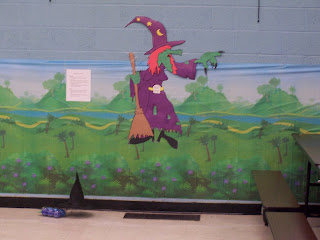
Melt the Witch was the next game in the rotation. We had a witch's hat on an empty 2 liter bottle. The kids tossed blue balls at the bottle to knock it over. This was surprisingly difficult for them! The prize for this activity was a mini bottle of bubbles. The witch is another enlargement from Pete Wells and the background is the other half of the Dora Explorer scene setter.
At the end of the Yellow Brick Road was the Emerald City. There were three activities available here, although only two of them are pictured (you can see the Lion game circle in the front of the picture). The kids were able to frost and decorate sugar cookies at the table on the right. The table on the left held a variety of green-themed sensory toys. After I took this photo I set up the portable podium with a lap top that was running the Wizard of Oz cause effect activity from Pete Wells' Oztastic unit. The kids had a lot of fun pushing the button to make Oz speak over the surround sound system. And don't you just love that the stage curtains are already green? Made the perfect backdrop for watching the movie during lunch. They even matched the Wizard's throne room.
The sensory table contained a variety of toys I found at Wal-Mart and/or had available in my classroom including: green Moon Sand, green plastic leis, green sensory/discovery bottles, green Flarp, a "slime" ball, a green fish that vibrates, a green hand held fan that lights up, and a bottle of green bubbles. The prize for the section, besides a cookie, was a mardi gras bead necklace.

We also had a "field of poppies" for kids who needed a break from all the action. The poppies are simply red paper plates taped to the wall. We had a CD player in here as well with the soundtrack to Wizard of Oz. We used folded up cafeteria tables to create a room divider of sorts.
It was actually warm enough for the kids to go outside for a few minutes while we set tables up for lunch. After everyone was settled with their sack lunches we started the movie on the big screen. The kids were enthralled. And the kids who needed to be more active were able to run around at the other end of the gym.
Set up took us about two hours (not counting the time it took us to make the decorations--gotta love teacher work days) but clean up only took about 20 minutes even with us salvaging what we could of the decorations. Best of all, everyone left with smiles on their faces. I really wish I could share the photos of all the fun we had.

Saturday, January 17, 2009

Still more Oz fun

I was in charge of a ROCKO event today. Because I already had lots of resources for a Wizard of Oz theme, that's what we did today. The kids had a blast making magic wands and Over the Rainbow necklaces (multiple colors of pony beads on lanyards). We even did an interactive viewing of the movie: singing all the songs, dancing along with Dorothy and her friends, blowing bubbles whenever Glinda appeared, booing the witch, etc. while we ate Munchkin Munchies (Chex snack mix).

We also played Follow the Yellow Brick Road:


Materials:
  • 8 1/2 X 11 yellow paper (20 sheets or at least one for every player)
  • pictures of characters and places in the story to glue/tape onto the yellow paper (laminate for durability if you want to be able to use them again); a good source is Pete Wells's Oztastic unit
  • matching pictures for a "draw" pile or to put on an All-Turn-It spinner
  • sound track to the movie
  • small prizes (optional)

Procedure:

  • Lay the yellow paper "bricks" out in a circle, picture side up (we used yellow duct tape to secure ours to the floor)
  • Have the kids choose a brick to stand on
  • Start the music; the kids move around the circle until the music stops
  • When the music stops, everyone stops on their spot
  • Pull a picture from the "draw" pile or spin the spinner
  • The person standing on the spot can receive a small prize, become the Music Master, or whatever other activity you choose to use
  • Continue, engineering as needed to make sure everyone has a chance to "win"

Variations:

  • Play like traditional musical chairs, removing one spot each time until only one player remains
  • Put action options on the All-Turn-It spinner; the person on the spot that is drawn gets to spin then do the action chosen (or choose someone else to do the action); options might be "melt like the witch," or "sing We're Off to See the Wizard" or "dance like the scarecrow" or "freeze like the rusted Tin Man," etc.
  • Let the student who lands on the "lucky spot" don a witch's hat and become the Wicked Witch to swoop in and "get" the next person who lands on the lucky spot
  • Have the student who lands on the lucky spot act out something related to their spot
  • Have each student identify the character/location/vocabulary term he/she lands on or tell something about the item
  • Have the student draw a card then follow the circle until he/she finds the matching brick
  • Have a race to see who can match the cards to the bricks the fastest; must follow the path; could do this as a relay race, just make the path a straight line and have one team per side
  • Could do the same as the matching activity but use comprehension questions instead
  • For better access for wheelchair users, put the path on the wall

We used the following characters/places/things: Dorothy, Toto, Auntie Em, tornado, house landing on witch, Munchkin Mayor, Munchkin drummer, Lollipop Munchkin, Glinda, Wicked Witch, ruby slippers, Scarecrow, Tin Man, Lion, angry apple tree, Emerald City, Witch's castle, The Great Oz, the Wizard, and flying monkeys
Other items might be: rainbow, hot air balloon, Munchkinland houses, water bucket, broomstick, yellow brick, basket, Uncle Henry, Miss Gulch, oil can, magic wand

Tuesday, December 2, 2008

Some of my favorite things

The theme for this month's Assistive Technology Blog Carnival is "My Favorite Things," specifically things that can be used as AT gifts on a budget. Here are a few of my favorite things.


  • USB flash drives: I use these to back up communication boards for a student to send between home and school, to load photos to send home, and to transfer projects done with SwitchIt! Maker so parents can use them at home


  • Abilitations Actitunnel: I've mentioned this device before; it is one of my all-time favorite pieces of equipment; it is light weight, collapses into a managable and storable size, and provides a whole lot of fun for every child I serve


  • Little Step-by-Steps: communication fun for everyone


  • All-Turn-It Spinner: a terrific way to include every member of the family in game night


  • Digital picture frame and/or digital photo keychain: share slide shows of school and family events with others, use with photos of family members as a calming device, add scanned pictures from a favorite picture book for a portable digital book (granted there's no sound unless you want to spend bigger bucks, but isn't a picture supposed to be worth a thousand words anyway?), put PCS or other communication symbols on a photo keychain to be used for easy communication in the community, load photos of community places and/or PCS symbols to use as transition cues for people who need that kind of structure

  • An mp3 player: these are the number one most popular item in my classroom; while we have ipod nanos there are now many on the market that can be obtained for a very reasonable price; perfect for listening to favorite music, audio books, and even messages from familiar people created using a program like Audacity


  • Hand held massagers: relaxation anyone?


  • Swifty switch adapter: will make any computer with a USB port switch accessible with no extra software; plug and play is awesome!


  • Batteries: seems like an odd gift, I know, but anyone who has kids knows their value


  • Crayola Glow Station: I haven't actually played with this yet but it looks soooo cool; a terrific toy for kids with low vision and what a fun partner activity for kids who might not be able to access the light wand independently but could make choices about what to create; a great addition to a multisensory space


Sunday, November 9, 2008

What can you do with a PowerLink?

Questions I've heard a lot recently:
What is a PowerLink?
How do you make a PowerLink work?
What can you do with a PowerLink? Or Why should I get one?
How do you use your PowerLink?

After hearing these types of questions from more than one special educator, some of whom are fairly savvy in the world of assistive technology, I did some quick research to see if AbleNet or somebody else had put out an idea list for a PowerLink similar to the ones that are out there for switch use and using a Big Mack. I was surprised to find NOTHING. Nothing? No ideas whatsoever (OK, that I could find in a 30 minute Google search) for one of the most versatile and easiest to use evironmental control units on the market? So I decided to make this the topic of my next blog post.

First, an introduction to AbleNet's PowerLink 3 environmental control unit. It is basically a box that allows you to adapt electrical appliances and devices so they can be accessed using switches. There are four basic modes of operation: timed seconds, timed minutes, latch, and direct. The timed modes allow the device to run for a set period of time (0-60 seconds or minutes) after the switch is activated (also known as press and release). The latch mode is basically an on/off switch: one switch activation turns the device on, the next turns the device off. Direct mode requires the switch to remain activated to cause the device to run (also known as press and hold). The PowerLink 3 allows you to connect up to 4 different appliances (2 on each side) with 2 switches (which means that when the right switch is pressed both appliances on the right will run at the same time). Some of the units allow for wireless control using an Airlink switch. You can also achieve wireless control using a jellybeamer transmitter and receiver (my preference because you don't have to have a direct line of sight between the transmitter and receiver). Essentially you can plug any electronic device into a PowerLink, but there are some limitations to the amount of juice it is able to handle. For instance, I think a large TV would overwhelm the device and I don 't think it could handle all the Christmas lights on your house, although it did just fine with the Christmas tree. It opens up participation possibilities to kids with physical and other challenges in a host of areas including daily living skills (cooking, cleaning, personal care), leisure activities and play, vocational skills, and artistic expression. I couldn't live/teach without it (as noted in a previous blog post). In fact we have four in my classroom with an additional out on loan and they are used every single day.

Now for the question of what to do with a PowerLink...

Use the timer to work on cause effect skills using a tape player and a tape of favorite music or stories (sorry, CD players do not currently work with a PowerLink because interrupting the power flow to one completely stops the play; would love to see AbleNet or somebody else work out a solution to this; the "adapted" players I've seen out there only allow for latching/on-off activation and they are battery hogs). Works great with a radio too.

Use latching to allow a switch user to control the music during a game like musical chairs.

Use latching to allow a switch user to control the pacing of an audio book or to pause the story when given a cue by the teacher so the class can engage in discussion.

Use either timed seconds or direct mode to operate a hair dryer to:
  • dry hair after swimming or bathing
  • dry paint on an art project
  • dry dishes
  • participate in science experiments

Use to adapt appliances like the mixer, blender, or food processor during cooking activities.

Attach blinking lights and place on direct mode to allow a child to explore switch use (see Two Switches to Success by Linda Burkhart, et al). Or use timed mode to more actively engage a passive student in sensory activities.

Use latching and a paper shredder to work on following directives during vocational training (turn it on now; OK, turn it off).

Using direct mode, attach two different toys/devices to allow a student to explore (two switches, two uses). Direct mode allows for greater independence than timed. In timed mode the first device activated will continue operating for the preset time no matter how often the student activates the other switch. Direct mode removes this exploration obstacle.

Allow the student to operate his own electric toothbrush (if it plugs in) or water pik during self care.

A water pik can also be used in a water table or to water plants, just be sure to keep the electicals safe from water intrusion.

Use the mode of your choice and attach to a vibrater/massager mat (we found ours at Wal-Mart) so the student can control the activity without getting overwhelmed.

We like to hook our bubble machine from Wal-Mart up to the PowerLink and blow away.

Adapt a fan for a student who overheats easily, who likes to feel moving air, or to blow on and move a mobile.

Attach to a lamp using latching mode so a student can signal for assistance during nap/quiet time or simply control the amount of light in his environment (like in a multisensory space).

Allow the student to work as a partner with someone else to operate a vaccuum or dust buster.